So out of morbid curiosity I tried Tumblr’s export feature to download my blog. Pressed the button, waited. After a few hours I got an email it was ready.
For my relatively modest blog of ~5K posts/reblogs, it produced a zip file of about 12 GBs. It didn’t say how big the file was when downloading; I just had to wait until it was done. Once downloaded, Windows 10′s native zip management couldn’t handle it, insisting it was a broken archive. An ancient dusty install of 7Zip popped it right open, though.
Inside were two folders and one .xml file:
“Media” clocks in at 12 GBs and consists of 14K gifs, jpgs, pngs, mp3s, mp4s, and movs. “Posts” has a folder of individual stripped-down HTML docs of every post, plus an xml doc that also seems to be every post in a single 21MB file. (This doc does appear to include my 800 draft posts.) And messages is all your messages/chats (which I admit is nice to have a backup of, though the xml is of course unreadable without some kind of reader).
But the best, the BEST (sarcasm level 8) part of this is that all those HTML/XML post files? They link back to the files ON TUMBLR. They don’t have internal links to the files in that Media folder. So when you open one of your downloaded posts in your browser, the images you’re seeing are from Tumblr’s servers – for as long as those images are posted and you’re online.
So this reblogged post, ‘capped from my downloaded archive:
Meanwhile files in the Media folder are just numbered by the post ID number, not those strings. It would be possible, I’m guessing, to run a conversion, to switch all the media links to using the ID numbers to link to what’s in the media folder – but that’s beyond my limited regex skills. Without that, you’re left with a pile of media with no organization whatsoever, and a folder full of posts with broken media.
(Things like this make me wonder if they’re not trying to repackage the site for advertisers at all but are just trying to kill it quick. Then again, trying to ascribe any kind of firm rational motive to whoever’s in charge of this feels like accusing a clogged toilet of having an agenda…)
Thank you for doing this! (Also … OMG TUMBLR. >__>) To some extent that’s actually somewhat better than I was afraid of, because at least you have all the images and the text of the posts, both in easy to read formats; I was worried it’d be one giant horrible thing that you’d need some kind of decoder program to read, and you’d have to pull out images individually if you wanted them. (I mean, back in Strikethrough days I remember finding a 3rd-party site that would download your journal as a PDF but didn’t include most of the images or comments. This sounds like an improvement over that, at least!)
… but still.
Also, I started a backup running yesterday and nearly 24 hours later it’s still just showing me “backup processing” which is … not promising. (This file is going to be huuuuuuge.)
Oh yikes. Well, that answers my question anyway. Sheesh.
Okay, so if you’ve noticed that when you go to your front page, a lot of old posts are randomly resurfacing and your new posts are getting buried under them no matter what you do, there’s a REALLY EASY fix for it!
Just go into the resurfaced old post, and edit it in some way. In my case, I added a tag that said “test”. Any kind of edit to the post will be fine as long as you save the changes. Edit: You might not even have to edit it! Just save the post again. If you have Xkit’s mass post tagger that might work as well? I didn’t test it.
Then I reloaded my front page and behold! The old post was back in my archives where it belonged!
(Incidentally, if the theory that this behavior is caused by posts getting flagged and unflagged, then you can see which posts of mine tumblr’s bot thought were nsfw by looking at the test tag)
Here is how to fix the glitch if you have it. (Thanks for blogging this jaalamadarav)
For magic improvements on thing that is already perfect:
Use one spoon white sugar, and one spoon brown if you have it.
After microwave, before noms, add vanilla ice cream.
o/
salt is a flavour enhancer, add just a tiny dash, not enough to make it salty.
Because I love you all.
reblogging cause i need to save this
A note for those who have trouble measuring butter with a spoon as I do: one cup I am sixteen tablespoons. Butter/margarine bricks are usually a half a cup, so just cut one eighth of that amount
anyways thanks for posting a 45 minute stream promoting his channel on the first night of Hanukkah ¯_(ツ)_/¯
I actually was a fan of yours back in middle school, i’m super sad to see that this is where your content is going.
(goyim please rb but keep your opinions off my post)
All of these people who respond to this sound like…toddlers, grade S toddlers. Honestly, the past is the past, or is that too hard to understand?
Please explain.
This shit was resolved so long ago. Pewdiepie himself fucking apologized and was punished for this shit.
Can y’all stop shitting on this man just because he’s famous and made jokes in poor taste?
He made a mistake, paid for it, and y’all are still treating him like shit.
His apology was terrible and he’s gone on to do antisemitic and racist things since. Like, how many times does he has to make these “mistakes” before we are allowed to not forgive him in your book?
I was not aware he kept doing it. Nor was I aware that his apology sucked. And I couldn’t look for this stuff because I’m on limited data and can’t waste it looking through hundreds of videos to find his apology.
Now, if he kept doing it, then fuck him. Second chance was offered and he spat in our faces.
No one’s ever gonna convince me it’s ok to shit on markiplier for this though. All he did was talk about his friend. And when this shitstorm initially happened, both him and Sean condemned Pewdiepie’s actions.
You can condemn the actions of your friends while still being friends with them. It’s entirely possible Mark isn’t even aware that Pewdiepie kept going with this shit. I highly doubt that with all the stuff Mark does on a daily basis that he has time to watch Pewdiepie’s videos.
If you don’t have time to watch his videos or hear about his constant racial slurs and antisemitic “jokes” then maybe you shouldn’t be telling people to follow him.
Like, he can make a video saying that pewdie is not an antisemite or any of “these labels” and even people you abhor deserve respect and that he deserves respect but he doesn’t keep up with the literal headline making racist things that his friend does and says?
If you support someone who has been racist, repeatedly, by asking people to subscribe to them to win an imaginary internet competition you made up that pretends to save YouTube, then I will judge you for supporting a racist.
It’s not complicated and honestly if you know you aren’t informed on the subject maybe you could listen to the Jewish O P and just … Not assume you know better than them? Just be quiet when you know that you don’t know half of what is going on.
I’d add: Even if this defense did hold water, you’re saying that he’s blatantly recommending a product he knows not one fucking thing about, which is actively harmful to some of the people he’s recommending it to.
Why exactly shouldn’t his credibility get fucking destroyed for that?
I feel like people are getting angry over Pewdiepie vs T-Series because they’re imposing a bunch of other community concerns onto it. For the Youtube community, it’s not just “Pewdiepie vs T-Series”, it’s “individual creators vs corporations”, it’s “individualism vs capitalism”, it’s “Youtuber vs record label”.
This is a problem that has struck to the core of Youtuber anxiety, and corporations elbowing out youtube-original creators has been the main issue at the center of Youtube politics for so long now that people are acting like “Pewdiepie vs T-Series” is the most important battle ever waged for the soul of Youtube.
This has led a lot of people to openly ignore a lot of the horrible shit Pewdiepie’s done and said in favor of portraying him as the Youtuber hero the site needs to survive. As bad as Tumblr’s getting right now, with the explicit content ban, Youtube is in almost as dire straits, and while T-Series getting more subscribers than Pewdiepie won’t actually mean anything significant, people have projected all of their hopes and fears built up for the last few years into this one “battle for ultimate Youtube supremacy”.
For what it’s worth, I don’t think Mark (or Jack, for that matter) have ever personally said or done anything problematic, and they’ve both done a lot to support various underprivileged communities through charities and the like. They’ve also spoken out on their channels against bullying others because of their race, ethnicity, gender identity, or sexual orientation.
The problem is that they’re blinded by their friendship with Felix to realize what a shit-bag he really is. They’re caught in the trap a lot of people, unfortunately, get caught in where they think their friend can’t possibly be a racist, or a sexist because racists and sexists are evil monsters, and Felix is nice to them, so he can’t be an evil monster.
They don’t realize that racism and sexism are things you do and are taught, not things you inherently are, and your words and actions are indicative of your true personality. This is a trap a lot of people are stuck in, where they have that one friend who says some racist stuff, but you know the guy, and you know that he’s not REALLY a racist, he just “has an edgy sense of humor” and “likes to get a rise out of people”.
To expand on this, on Youtube, Pewdiepie isn’t just A Youtuber. He’s The Youtuber. He is Mr. Youtube himself. He is the hero to the common man, the lowly Youtuber who only wants to make it big in the world. In the eyes of the Youtube community, Felix is living proof that Youtube belongs to Youtubers, not to corporations. Pewdiepie is a symbol on Youtube, and when that symbol is attacked (rightfully so, because of his racism), people on Youtube take it as a personal attack against themselves and the soul of Youtube, so they rush to defend him, regardless of how deserved it is.
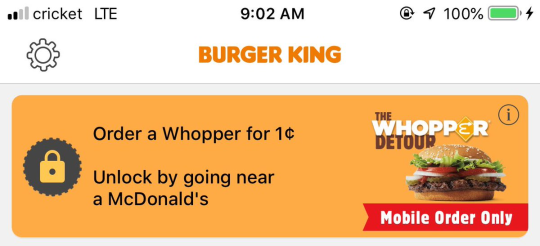
burger king is offering a 1 cent whopper through their mobile app if you unlock the coupon while at a mcdonald’s
why does the burger king app have quests
This is what happens when you bring back monarchy. First it’s “Go visit a McDonald’s,” but next thing you know you’ll be slaying dragons for a free fruit pie.
Okay, folks. So. Tumblr’s jumped the shark in a big way, and I’m not even just talking about indiscriminately blocking all “adult” content on a platform that IS, in fact, primarily 18+.
Many blogs, like the wonderful @blackkatmagic , that are not especially NSFW have vanished.
(And I for one LIKE being able to go to curated porn blogs run by actual people and have a chance of finding stuff to my taste, it was one of the things that kept me on this hellsite, but that’s another issue entirely.)
I know lots of people are talking about migrating, but none of us are sure to where yet. Pillowfort seems to be an option, some people are talking about Twitter. But for now, it’s a mess, and even if we knew where we were going, it’s often a huge process, and a lot of us have stuff on tumblr that ONLY exists there.
One possible quick solution to save your blogs, both NSFW and personal, is to import it to WordPress. I found this solution through from frantic googling on how to save an entire blog, text posts an all. There are several apps for downloading all the pictures from a tumblr, (Plently for Windows, but only a few paid ones for mac, of which Tumbelog Picture Downloader is working for me so far) but this is the only solution I’ve seen so far that allows you to save EVERYTHING. I downloaded my NSFW blog in like 10 min. My regular blog, which is significantly larger, is in the process of importing, but I don’t anticipate any problems. I will, of course, update you if I have any.
This tutorial I found worked really easily. http://quickguide (.) tumblr (.) com/post/39780378703/backing-up-your-tumblr-blog-to-wordpress
I put parenthesis around the .’s like we’re back in FF-Hell, just in case tumblr’s new thing about outgoing links kicks in. You know what to do.
To break it down, just in case:
Sign up for a WordPress.com account at wordpress (.) com/start
You’ll have to create an account, with your email, a username, and a password. They should send you a confirmation email immediately, check it, activate it, and you’re good to go.
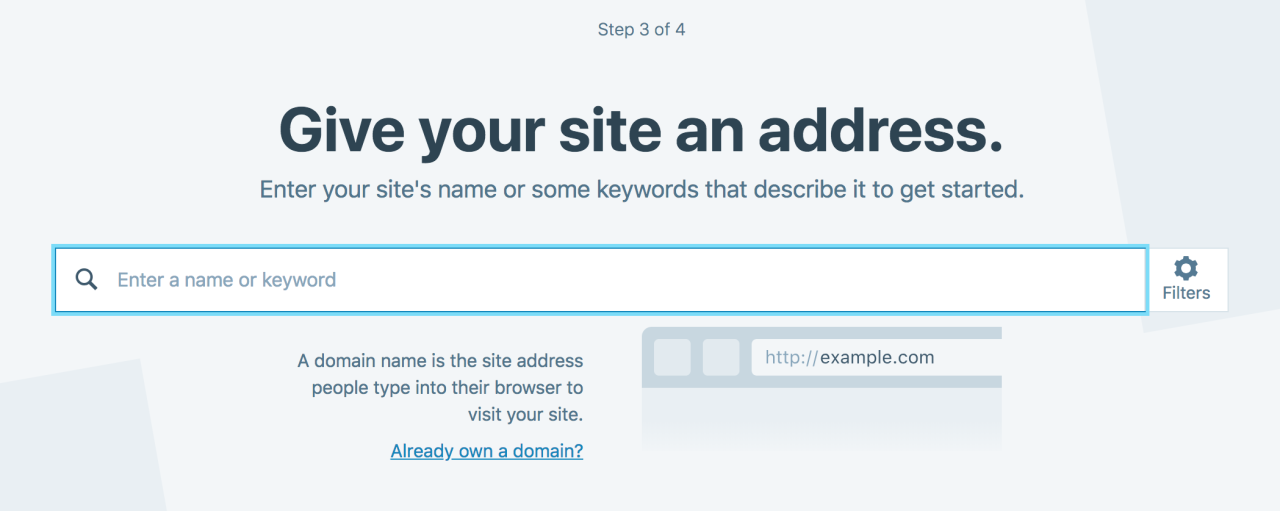
On the site, it will ask you for a site name. That page asks you a bunch of other information too, but you only have to fill out the site name.
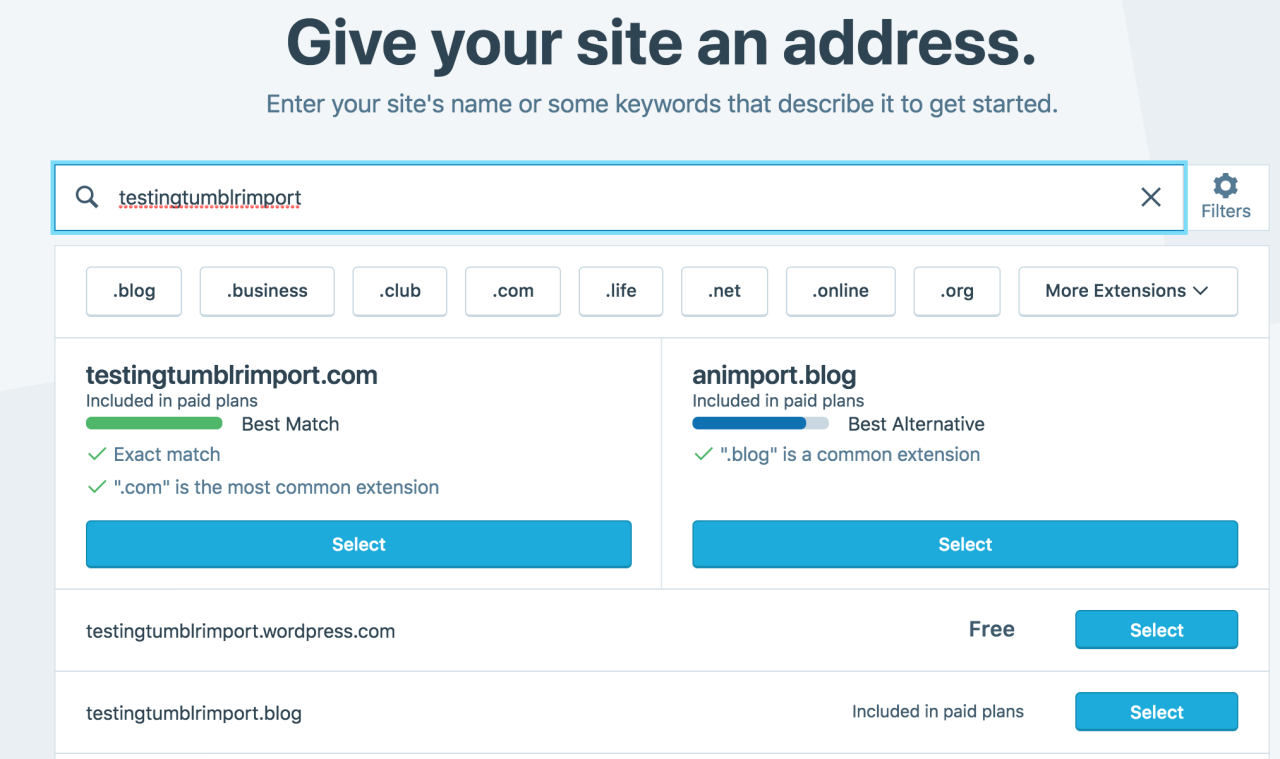
Then you have to give your site a URL. If you’re lucky, your tumblr URL is still available, if not you’ll have to come up with another one, sorry.
It will tell you if that option is still available for free.
Then it will ask you to pick a plan. Free is really good enough, I swear.
Now you’re set up! You can import your tumblr!
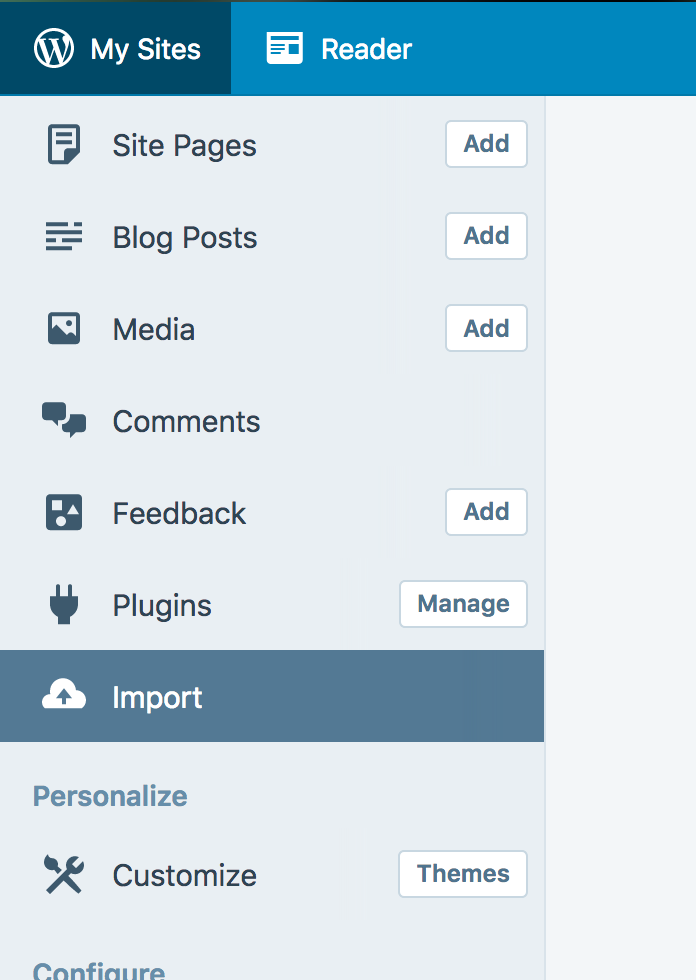
The only differences from the linked tutorial are that the Import button is now on the first level menu, not in tools.
Hit Import, then you have to follow the link for “other importers” at the bottom, to find the option for Tumblr.
Then you’ll have to sign in with tumblr, using your normal tumblr credentials. You’ll be redirected there automatically.
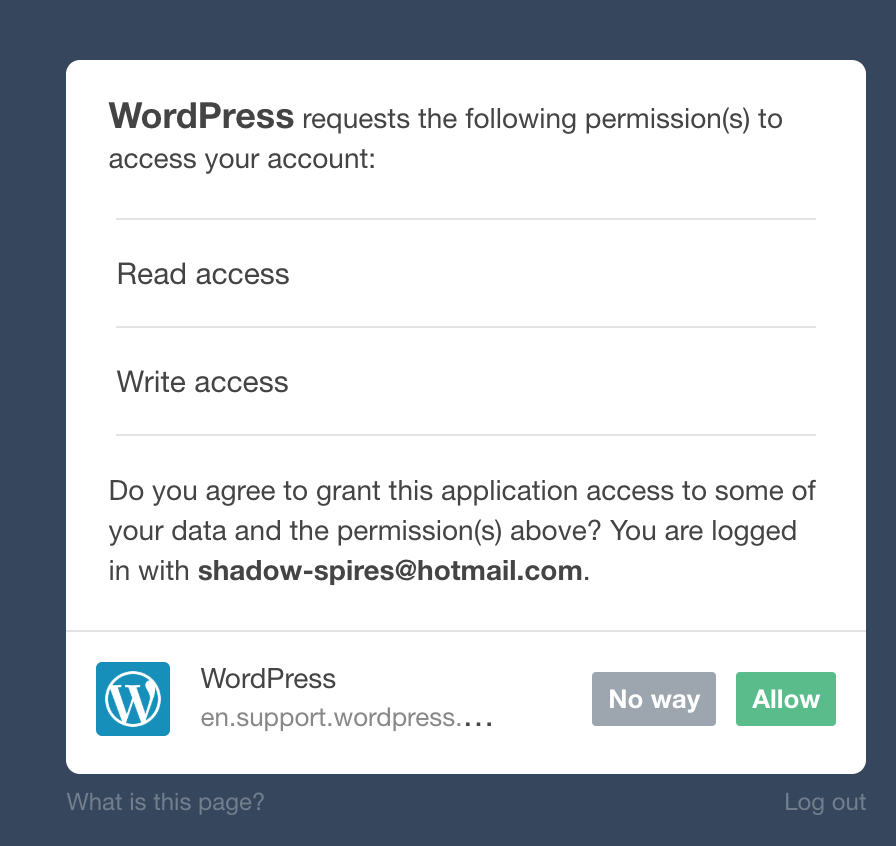
You’ll have to allow WordPress permissions on your blog.
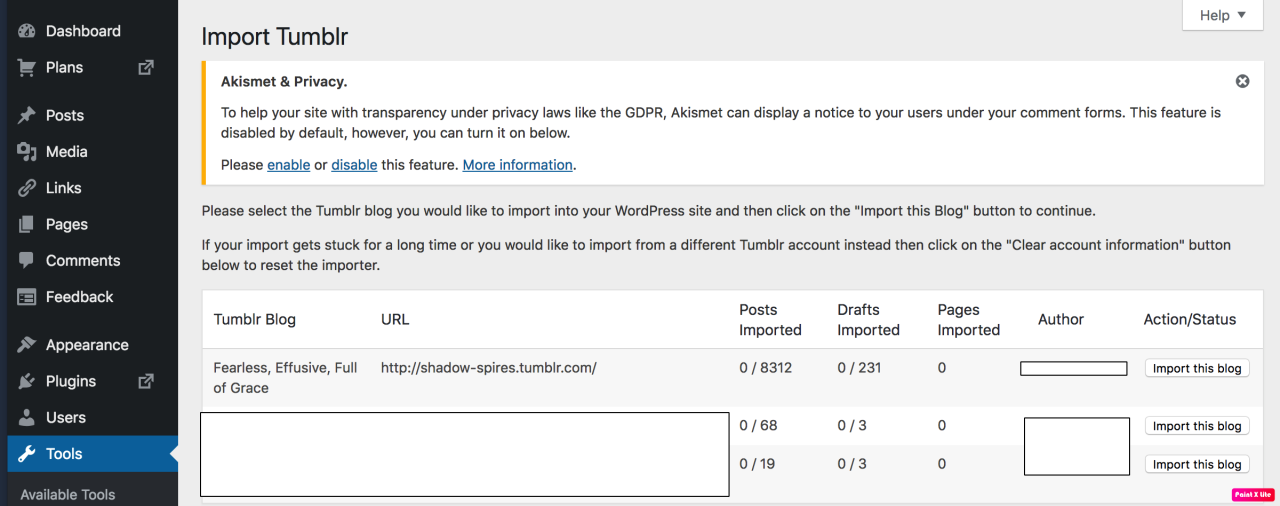
Then your blogs, including all your sideblogs, will show up in wordpress.
Hit import, wait a WHILE depending on the size of your blog, and you’re done!
ALSO!!
I made my NSFW blog private for now, since I don’t know WP’s policy on NSFW.
This means that to access it, someone has to have an account and request access. But hey, part of our problem on this hellsite has been people going places they aren’t wanted, so I don’t personally see this as a bad thing. They can send a request from the landing site on your blog, you get an email, click a link in the email, and PRESTO, they have access.
To make it private, go to Settings > Reading > Site Visibility. Go back and check, it took me changing the setting twice for it to actually stick.
tl;dr, you can import your entire blog to wordpress in just a few steps.
I’m going to tag the hell out of this, in no particular order. PLEASE reblog this and spread the word so people know it’s an option. If you’re having trouble, PM me, and I’m happy to help.
I was just semi-complaining that I was still looking for a decent way to backup my +4k posts without having to use paid services or even just wordpress (which has an import from tumblr tool that asks for permission to access your blog and also make posts), when I decided to actually put some effort into my google search.
Results were positive: I have successfully backed up my blog*
*By which I mean: everything that I have ever posted. Not included: drafts, queue, likes, followers, following, comments, notes, chat.
I followed this method (word by word), and now have a 450 MB folder on my computer with the name of my blog on it containing:
1. Folder “Archive” (contains .html files listed by month) 2. Folder “Media” (contains gifs and images, mine has +1k files in it; might contain also audios but I have no way of confirming that because I’ve never reblogged an audio post from this blog) 3. Folder “Posts” (contains single .html files, each one a post; I have +4k files in it) 4. Folder “Theme” (contains only my avatar, but it might be a matter of if you have personalized themes or not) 5. .html file “Index” (by opening it it will give you the archive of your blog organized by month; clicking on a month will open up the archive for that month, and you’ll be able to read all the posts for that month as if you were on your blog**, except sans your theme graphic, with each page containing 50 posts)
**I can see gifs, links, embedded videos, tags, number of notes (but I can’t open up the notes, clearly), text is also correctly formatted.
So yeah, in case anyone wants a very quick way to back up their blog, it took me less than 10 minutes.
P.S. I didn’t have any issue, but to be on the safe side always check for spyware and virus threats before and after downloading anything.
There is also TumbleThree, a standalone program, if you prefer a GUI over command-line. Also seems to have more options, such as downloading your liked posts.
Haven’t tried it myself so I can only vouch for my OP, but I’ll reblog for the alternative.
According to Tumblr themselves, starting December 17th, NSFW material will no longer be allowed on their site at all (saw that coming since Yahoo bought them out, I’m positive they’ve just been waiting for an excuse). This includes any NSFW photos, videos, graphics, gifs, etc. They say it won’t include erotica text but honestly the former is just a step toward the latter, check our receipts for the ff.net purge and livejournal strikethrough. And since it’s an algorithm not a human coming after NSFW content, they’re using a “take down first, reconsider on appeal” method- just like LJ did, and content that IS SFW can be flagged and taken down without a human checking it first. I’ve had photos of my birds taken down because of this, so don’t assume you’re safe from this absolute nonsense because you don’t post NSFW content.
I’ve used the above method personally and can affirm it worked fine for me. I would absolutely recommend you do it, too, and sooner rather than later.
Storm’s coming folks. Time to get to safety. Grab the contact info of whoever you want to stay in contact with now. If you’re a content creator of NSFW material, get setup someplace else even if it’s only temporary, and tell your followers where to find you.
Stay safe, friends. I hope to see you on the other side.
There’s a step missing in this guide. When you add stuff to the the $PATH you also need to add Python.
In system variables, add a semicolon (or a new line if you’re on win10 which takes separate entries) and also add D:Python (or wherever you installed Python to). Make sure this is the SYSTEM PATH not the user path.
You can check this worked by just typing Python.exe into command prompt from anywhere. you should see:
Python 2.7.12 (v2.7.12:d33e0cf91556, Jun 27 2016, 15:19:22) [MSC v.1500 32 bit (Intel)] on win32 Type “help”, “copyright”, “credits” or “license” for more information.
Also on win10 if you open the folder where the tumblr python file is installed, you can type cmd into the address bar at the top and it’ll open the command prompt right there and you won’t have to do the cd… file selection.
I’ve just checked and it’s happening to me too. About 4 posts missing (inc. reblogs) D: oh Tumblr.
and not like I’ve gotten any notice or explanation or anything.
I’m gonna check back in the morning and if it’s not fixed I guess I’ll send a message to support being like “explain please” but…jesus christ, that’s nice.
update: they’re showing up when I look at my blog on mobile…?
i give up and am going to fucking bed
I think this is happening to a few people–for some reason, new posts are showing up behind at least a few pages of old posts; I think on mobile I just had to scroll down once, but on the browser I had to go back 4 or 5 pages. And then it’s all kind of a mess because now I’m seeing posts I never got notifications for.







 I'm a defeatist but I don't have to be
