the more friends ask me about dreamwidth, the more i realize i know a lot about this site that isn’t super obvious at first glance. so here is a primer for those of you thinking about making a dreamwidth account. this post ranges from your really basic starter tips to the completely esoteric things that come from using it for a decade.
a what now? dreamwho?
Dreamwidth is a code fork of LiveJournal. A code fork means that they took LJ’s code (which used to be open source) and went their own direction with it. They still use the basic ideas behind LJ’s codebase, but have changed and improved upon it in various ways.
The core difference between DW and other websites is privacy isn’t an afterthought, but the central feature. You can lock posts, filter them to a select group, or make them visible to only you. I recommend reading through this section of DW’s FAQ for more on this.
When you make an account, you can subscribe (ie follow) and grant access to other users. Both of these are one-way – if A subscribes to B, that doesn’t automatically grant B access to all of A’s locked posts. Here’s more on this.
DW in general can be kind of confusing for people who have only used tumblr, but their FAQs are pretty good on the whole, and they’re searchable. If a website feature is confusing, start there.
okay, i have a journal. now what?
Customize it! DW doesn’t have all the latest and greatest features, but you can still make it your own. Here are some useful tips.
You can change your layout from Organize > Select Style. Mobile support is hit or miss, unfortunately, but there are some nice default layouts that work with it. You can also use this style for Practicality which makes DW fully mobile-friendly. If you’d rather design it yourself, Tabula Rasa is completely stripped down.
You can get premade DW layouts at the dreamwidthlayouts community. If you have trouble with your code, ask over at style_system.
Edit your profile! This is where you put your usernames for other social media sites, tell people a bit about yourself, and mention your interests. Your interests will be part of the interest search; it’s one way to find people.
Upload icons! Free accounts get 15 icons; paid accounts get 100 icons, premium accounts get 250 icons. You can use one icon in each entry and commment you make. It’s good form to put the maker of the icon in the comment section if you didn’t make it. If you got it from someone on tumblr, you can even link their blog using the code <user name=username site=tumblr>. (This works all across DW!)
While you can’t make pages, you can set a post to stick at the top of your journal, much like Twitter’s pinned tweets. Here’s how to do it.
You can also change how Dreamwidth itself looks, if you don’t like the red. Go to Account Settings > Display. Most other site display preferences are on that page.
While you’re here, look through the Account Settings > Privacy page. By default, your public entries will be included in site searches. You can turn it off at the bottom of the page if you want. You can also set it so your entries are automatically access-locked or private as well.
This got very long so the rest is behind the cut. (Now you really know I’m legit.)
For magic improvements on thing that is already perfect:
Use one spoon white sugar, and one spoon brown if you have it.
After microwave, before noms, add vanilla ice cream.
o/
salt is a flavour enhancer, add just a tiny dash, not enough to make it salty.
Because I love you all.
reblogging cause i need to save this
A note for those who have trouble measuring butter with a spoon as I do: one cup I am sixteen tablespoons. Butter/margarine bricks are usually a half a cup, so just cut one eighth of that amount
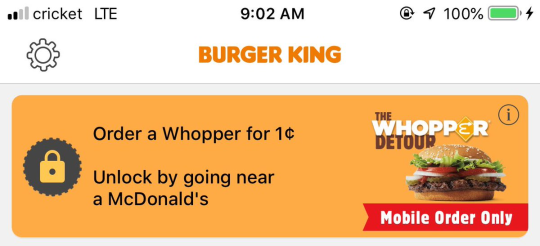
burger king is offering a 1 cent whopper through their mobile app if you unlock the coupon while at a mcdonald’s
why does the burger king app have quests
This is what happens when you bring back monarchy. First it’s “Go visit a McDonald’s,” but next thing you know you’ll be slaying dragons for a free fruit pie.
Okay, folks. So. Tumblr’s jumped the shark in a big way, and I’m not even just talking about indiscriminately blocking all “adult” content on a platform that IS, in fact, primarily 18+.
Many blogs, like the wonderful @blackkatmagic , that are not especially NSFW have vanished.
(And I for one LIKE being able to go to curated porn blogs run by actual people and have a chance of finding stuff to my taste, it was one of the things that kept me on this hellsite, but that’s another issue entirely.)
I know lots of people are talking about migrating, but none of us are sure to where yet. Pillowfort seems to be an option, some people are talking about Twitter. But for now, it’s a mess, and even if we knew where we were going, it’s often a huge process, and a lot of us have stuff on tumblr that ONLY exists there.
One possible quick solution to save your blogs, both NSFW and personal, is to import it to WordPress. I found this solution through from frantic googling on how to save an entire blog, text posts an all. There are several apps for downloading all the pictures from a tumblr, (Plently for Windows, but only a few paid ones for mac, of which Tumbelog Picture Downloader is working for me so far) but this is the only solution I’ve seen so far that allows you to save EVERYTHING. I downloaded my NSFW blog in like 10 min. My regular blog, which is significantly larger, is in the process of importing, but I don’t anticipate any problems. I will, of course, update you if I have any.
This tutorial I found worked really easily. http://quickguide (.) tumblr (.) com/post/39780378703/backing-up-your-tumblr-blog-to-wordpress
I put parenthesis around the .’s like we’re back in FF-Hell, just in case tumblr’s new thing about outgoing links kicks in. You know what to do.
To break it down, just in case:
Sign up for a WordPress.com account at wordpress (.) com/start
You’ll have to create an account, with your email, a username, and a password. They should send you a confirmation email immediately, check it, activate it, and you’re good to go.
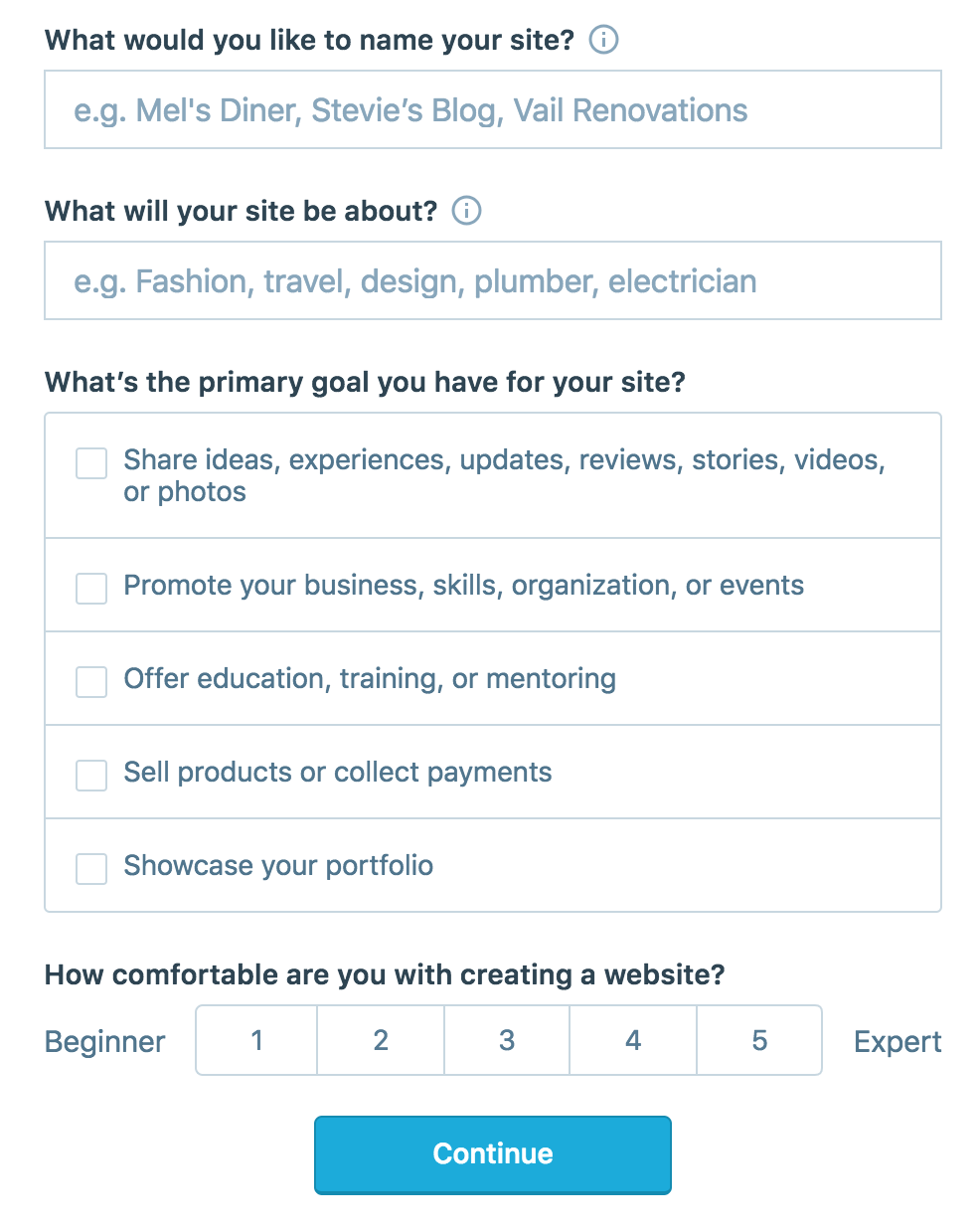
On the site, it will ask you for a site name. That page asks you a bunch of other information too, but you only have to fill out the site name.
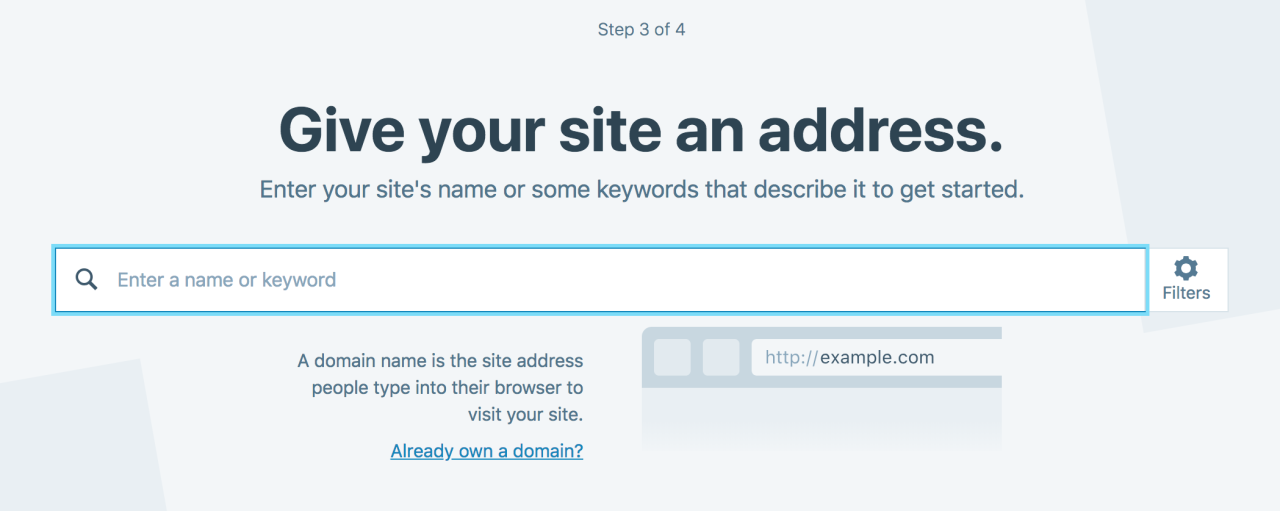
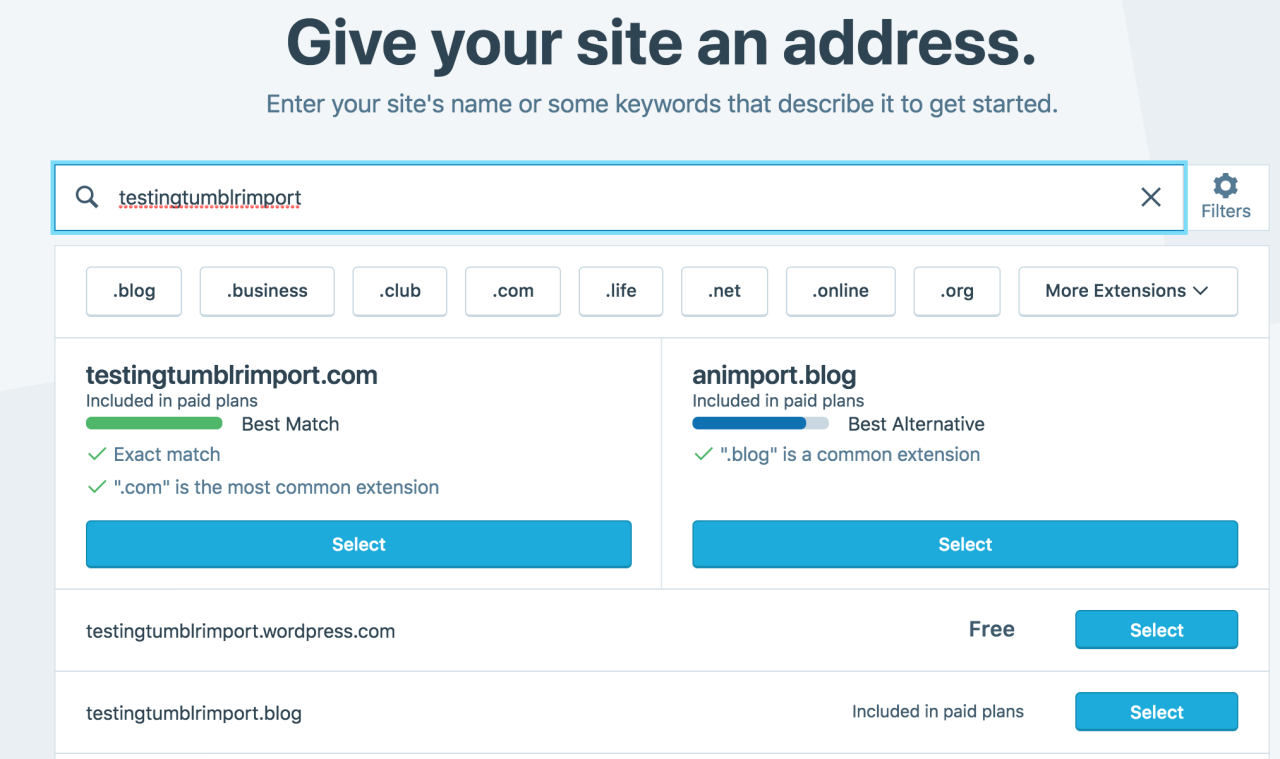
Then you have to give your site a URL. If you’re lucky, your tumblr URL is still available, if not you’ll have to come up with another one, sorry.
It will tell you if that option is still available for free.
Then it will ask you to pick a plan. Free is really good enough, I swear.
Now you’re set up! You can import your tumblr!
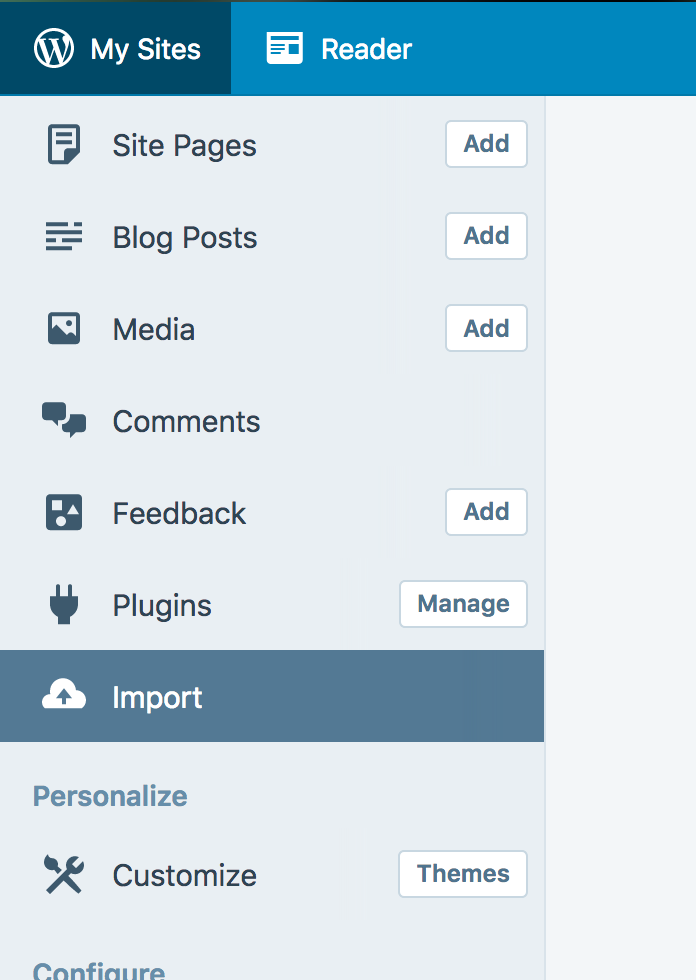
The only differences from the linked tutorial are that the Import button is now on the first level menu, not in tools.
Hit Import, then you have to follow the link for “other importers” at the bottom, to find the option for Tumblr.
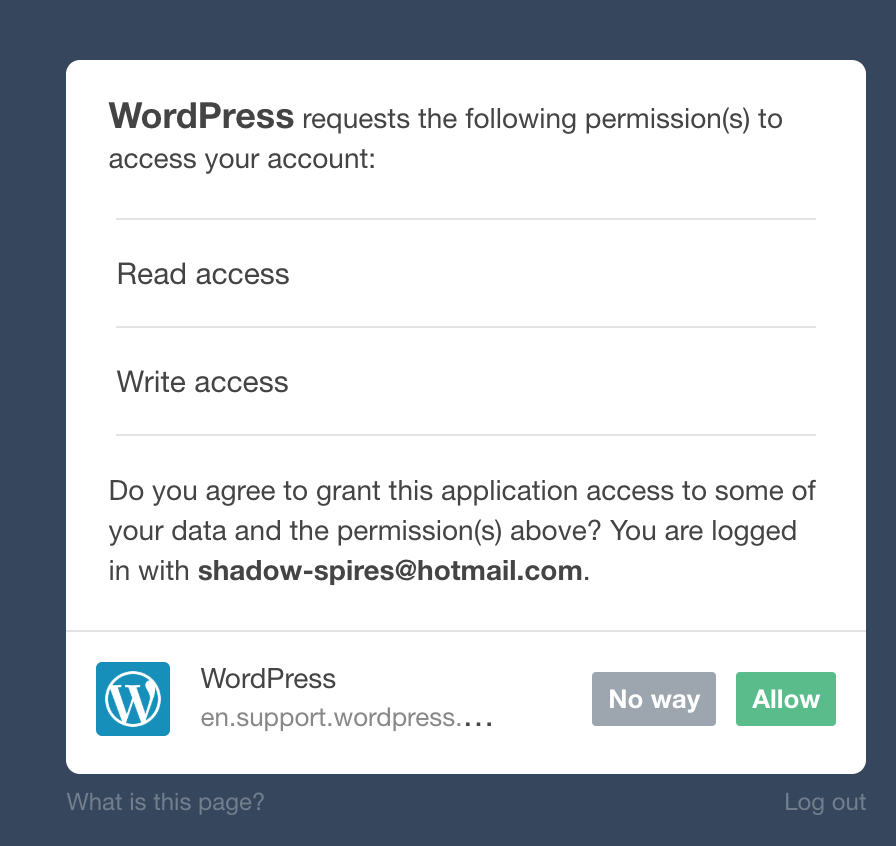
Then you’ll have to sign in with tumblr, using your normal tumblr credentials. You’ll be redirected there automatically.
You’ll have to allow WordPress permissions on your blog.
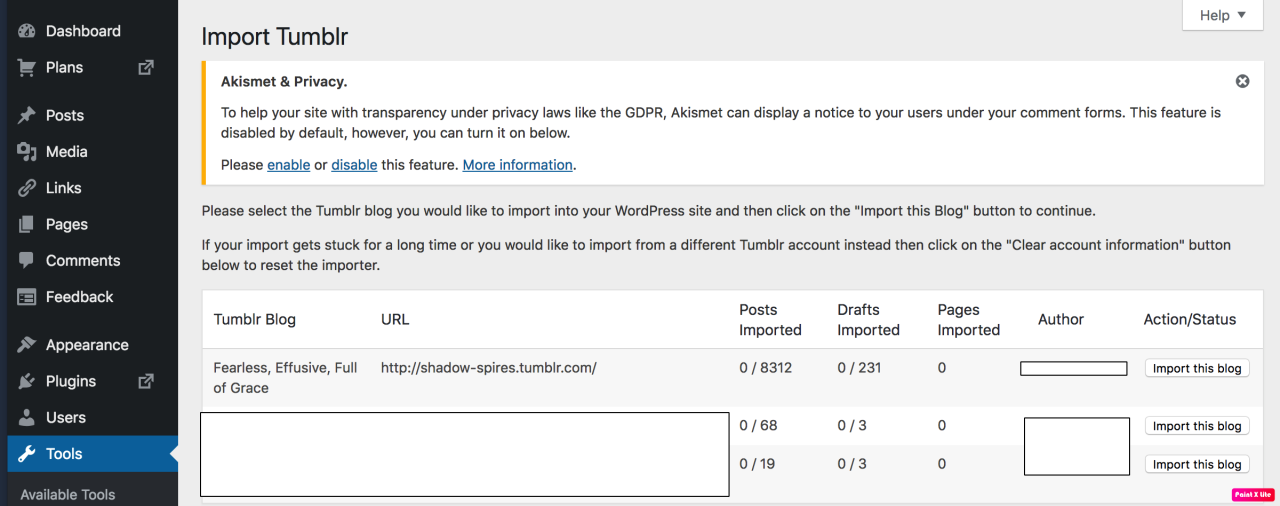
Then your blogs, including all your sideblogs, will show up in wordpress.
Hit import, wait a WHILE depending on the size of your blog, and you’re done!
ALSO!!
I made my NSFW blog private for now, since I don’t know WP’s policy on NSFW.
This means that to access it, someone has to have an account and request access. But hey, part of our problem on this hellsite has been people going places they aren’t wanted, so I don’t personally see this as a bad thing. They can send a request from the landing site on your blog, you get an email, click a link in the email, and PRESTO, they have access.
To make it private, go to Settings > Reading > Site Visibility. Go back and check, it took me changing the setting twice for it to actually stick.
tl;dr, you can import your entire blog to wordpress in just a few steps.
I’m going to tag the hell out of this, in no particular order. PLEASE reblog this and spread the word so people know it’s an option. If you’re having trouble, PM me, and I’m happy to help.
I was just semi-complaining that I was still looking for a decent way to backup my +4k posts without having to use paid services or even just wordpress (which has an import from tumblr tool that asks for permission to access your blog and also make posts), when I decided to actually put some effort into my google search.
Results were positive: I have successfully backed up my blog*
*By which I mean: everything that I have ever posted. Not included: drafts, queue, likes, followers, following, comments, notes, chat.
I followed this method (word by word), and now have a 450 MB folder on my computer with the name of my blog on it containing:
1. Folder “Archive” (contains .html files listed by month) 2. Folder “Media” (contains gifs and images, mine has +1k files in it; might contain also audios but I have no way of confirming that because I’ve never reblogged an audio post from this blog) 3. Folder “Posts” (contains single .html files, each one a post; I have +4k files in it) 4. Folder “Theme” (contains only my avatar, but it might be a matter of if you have personalized themes or not) 5. .html file “Index” (by opening it it will give you the archive of your blog organized by month; clicking on a month will open up the archive for that month, and you’ll be able to read all the posts for that month as if you were on your blog**, except sans your theme graphic, with each page containing 50 posts)
**I can see gifs, links, embedded videos, tags, number of notes (but I can’t open up the notes, clearly), text is also correctly formatted.
So yeah, in case anyone wants a very quick way to back up their blog, it took me less than 10 minutes.
P.S. I didn’t have any issue, but to be on the safe side always check for spyware and virus threats before and after downloading anything.
There is also TumbleThree, a standalone program, if you prefer a GUI over command-line. Also seems to have more options, such as downloading your liked posts.
Haven’t tried it myself so I can only vouch for my OP, but I’ll reblog for the alternative.
According to Tumblr themselves, starting December 17th, NSFW material will no longer be allowed on their site at all (saw that coming since Yahoo bought them out, I’m positive they’ve just been waiting for an excuse). This includes any NSFW photos, videos, graphics, gifs, etc. They say it won’t include erotica text but honestly the former is just a step toward the latter, check our receipts for the ff.net purge and livejournal strikethrough. And since it’s an algorithm not a human coming after NSFW content, they’re using a “take down first, reconsider on appeal” method- just like LJ did, and content that IS SFW can be flagged and taken down without a human checking it first. I’ve had photos of my birds taken down because of this, so don’t assume you’re safe from this absolute nonsense because you don’t post NSFW content.
I’ve used the above method personally and can affirm it worked fine for me. I would absolutely recommend you do it, too, and sooner rather than later.
Storm’s coming folks. Time to get to safety. Grab the contact info of whoever you want to stay in contact with now. If you’re a content creator of NSFW material, get setup someplace else even if it’s only temporary, and tell your followers where to find you.
Stay safe, friends. I hope to see you on the other side.
There’s a step missing in this guide. When you add stuff to the the $PATH you also need to add Python.
In system variables, add a semicolon (or a new line if you’re on win10 which takes separate entries) and also add D:Python (or wherever you installed Python to). Make sure this is the SYSTEM PATH not the user path.
You can check this worked by just typing Python.exe into command prompt from anywhere. you should see:
Python 2.7.12 (v2.7.12:d33e0cf91556, Jun 27 2016, 15:19:22) [MSC v.1500 32 bit (Intel)] on win32 Type “help”, “copyright”, “credits” or “license” for more information.
Also on win10 if you open the folder where the tumblr python file is installed, you can type cmd into the address bar at the top and it’ll open the command prompt right there and you won’t have to do the cd… file selection.
state offices are still closed today but I’m guessing this is the last day for that (I actually could go in today, but I don’t know if that means I could work or not, and despite my work deadlines…well, I have stuff to do at home still). sooooo, stuff I would like to get done today:
at least move the earthquake mess into piles so I have as much of a clear path to my Funko stash as I did before and my jewelry is more or less in one place again, even if it’s still generally a (pre- and post-earthquake) disaster
seal, package, and mail one of two outstanding Etsy orders, especially since apparently the USPS is going to be closed tomorrow to honor George H. W. Bush for some fucking reason???
work on the other outstanding order while watching more John Mulaney, because I finally pulled up Kid Gorgeous and I know I’m like the last person in the world to realize this but it’s amazing
vacuum this one spot in the living room where we had some broken glass
figure out the Bluetooth headphones that are supposed to work with the TV, because not being able to play music on my computer (no audio in safe mode! WHO KNEW) makes the whole “TV is always always on when my mom’s home” thing even more of a problem and this was the whole reason I bought those headphones for my mom’s birthday to begin with (I mean she asked for them but tbh it was basically a gift to myself, assuming they work well enough that she’ll actually use them)
recheck backups and run a repair install from the Windows 7 disc, because that will probably take a while and I should be here to babysit it
other things I would like to get done but that are probably less likely:
go to Planet Fitness
take donations to AWAIC, Covenant House, and Value Village, because I cleared several bags of stuff out of my room and now it’s all taking up space in my car, but the roads are horrifically icy so this should probably wait
go through Tumblr to find stuff I want to save, especially because I requested backups for all my blogs and have received emails for…none of them (that’s how it works, right? you request it and they email you a download link?)
update the Etsy listings for anything Fallout-related now that there are new figures available
finish and publish listings for a couple other things, at least the drafts that are already up
but first I still have to shower and get dressed, ideally before 1 pm 😫
how I was planning to spend my weekend:
work more on trying to revive my computer (specifically: manually update the video driver in case that’s the problem, and run a repair install from the Windows 7 disc)
finish one outstanding Etsy commission and try to complete another
play more Silent Hill 2
go through my entire stash of gifts to reorganize, get a better sense of who I still need to get gifts for, and weed out old stuff to donate somewhere
do some writing
what I guess I’ll be doing this weekend (instead or in addition to?):
cleaning. so much cleaning. my room was bad before but now it’s EXTREMELY bad and I’ll probably have to deal with some of the pre-existing mess to even be able to deal with the new mess, so that could take A LONG FUCKING TIME because it will mean making an even bigger mess to make room for stuff
messaging the customers for my two outstanding Etsy orders to say hey, I will still do my best to get this to you by Christmas but we have A Situation up here and among other things I’m not sure when mail will start up again
I love how the search function on this site is absolute garbage. I can look up a post word for word and I will NEVER find it
Pro tip:
Wanna find a post?
Write out what you remember into a Google search.
After you write that out, end with site:tumblr.com
Google will search for your text on just tumblr
In my experience, it’s way more effective than searching through Tumblr
(you can use site:SITENAME.com to search any site btws)
This usually works but for some reason a lot of posts get indexed on google from a person’s URL based on the posts that were recently reblogged on page 1, meaning that this is only a tiny bit more reliable.
I HAVE a solution to this, you have to write down site:tumblr.com/post “ “
and then write a direct quote (could be a fraction of a sentence) into the quotations, I’ve been doing this for years, and it’s so useful, it works like 99% of the time
(the more popular a post is the more likely you’ll find it)
If Congress does not pass legislation protecting the tribe and the legal challenge fails, the Mashpee would be stripped of their right to exercise sovereign jurisdiction over their land.
Jessie Little Doe Baird, the tribe’s vice-chairwoman, told Al Jazeera that loss of jurisdiction would prevent the tribe from running indigenous language schools, tribal courts, and housing projects, as well as its own police.
“We have our own police force, which is important because they’re tribal citizens and since we’ve had our own police force, none of our men have been beaten or shot, which we’ve had before with non-tribal police,” she said.
So let’s say you’re in the same boat I am (this is a running theme, have you noticed?) and you’ve just got, like, SO MUCH STUFF that HAS to get done YESTERDAY or you will DIE (or fail/get fired/mope). Everything needs to be done yesterday, you’re sick, and for whatever reason you are focusing on the least important stuff first. What to do!
Take a deep breath, because this is a boot camp in prioritization.
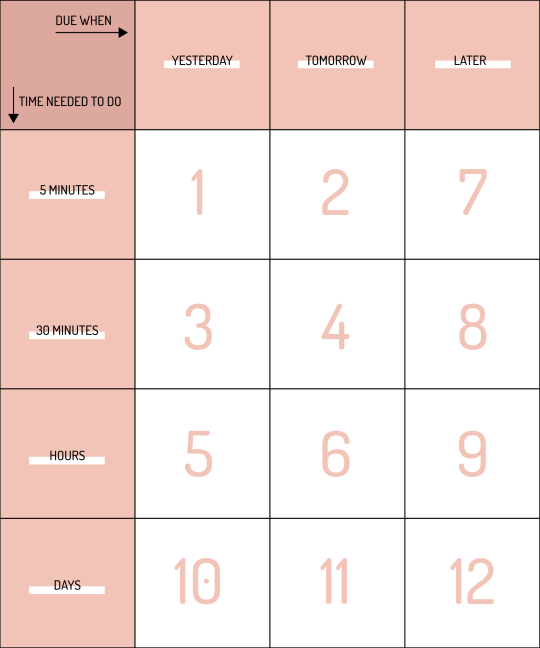
Make a 3 by 4 grid. Make it pretty big. The line above your top row goes like this: Due YESTERDAY – due TOMORROW – due LATER. Along the side, write: Takes 5 min – Takes 30 min – Takes hours – Takes DAYS.
Divide ALL your tasks into one of these squares, based on how much work you still have to do. A thank you note for a present you received two weeks ago? That takes 5 minutes and was due YESTERDAY. Put it in that square. A five page paper that’s due tomorrow? That takes an hour/hours, place it appropriately. Tomorrow’s speech you just need to rehearse? Half an hour, due TOMORROW. Do the same for ALL of your tasks
Your priority goes like this:
5 minutes due YESTERDAY
5 minutes due TOMORROW
Half-hour due YESTERDAY
Half-hour due TOMORROW
Hours due YESTERDAY
Hours due TOMORROW
5 minutes due LATER
Half-hour due LATER
Hours due LATER
DAYS due YESTERDAY
DAYS due TOMORROW
DAYS due LATER
At this point you just go down the list in each section. If something feels especially urgent, for whatever reason – a certain professor is hounding you, you’re especially worried about that speech, whatever – you can bump that up to the top of the entire list. However, going through the list like this is what I find most efficient.
Some people do like to save the 5 minute tasks for kind of a break between longer-running tasks. If that’s what you want to try, go for it! You’re the one studying here.
So that’s how to prioritize. Now, how to actually do shit? That’s where the 20/10 method comes in. It’s simple: do stuff like a stuff-doing FIEND for 20 minutes, then take a ten minute break and do whatever you want. Repeat ad infinitum. It’s how I’ve gotten through my to do list, concussed and everything.
You’ve got this. Get a drink and start – we can do our stuff together!
WOAH THIS SOUNDS HELPFUL. I’M GOING TO TRY THIS IMMEDIATELY. Also, I made a chart for myself, but if anyone else wants it for reference (or if this is wrong and I misread you can tell me) here it is:







 I'm a defeatist but I don't have to be